Telegram Bulk Messaging Software
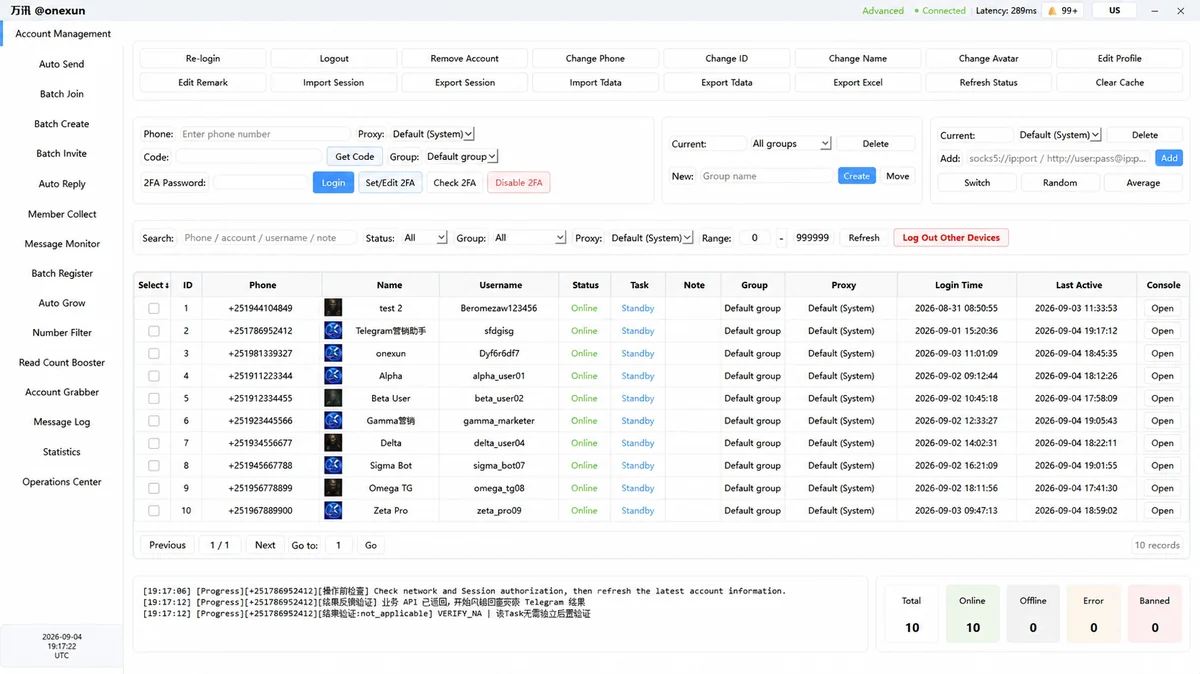
ONEXUN is a desktop console for sending Telegram messages across multiple accounts, managing groups and tracking the results — without switching between dozens of app windows. It also supports WhatsApp accounts.
Why use software for Telegram bulk messaging?
Sending the same update to many contacts or groups by hand is slow and error-prone, especially when you manage more than one account. A bulk messaging tool lets you set up the task once, assign the accounts that should send it, and then review what happened. ONEXUN combines this with account and group management, so the whole workflow lives in one place.
Features for messaging and account management
See the full feature list on the homepage.
Bulk Messaging
Configure message-sending tasks for your selected accounts and recipients.
Automatic Group Joining
Join selected groups or channels in batches before messaging.
Group management
Batch create groups or channels and invite users in batches.
Auto Reply
Reply to incoming messages automatically.
Message Monitor
Follow incoming messages using your monitoring settings.
Account Warm-up
Configure gradual automated account activity before regular use.
Message Log
Review the messages your tasks have sent.
Statistics
Check task activity and results in one place.
Who it's for
- Marketers running Telegram channel and group campaigns
- Agencies managing accounts for several clients
- Online businesses communicating with their own customers and communities
- Multi-account operators who need one console instead of many app windows
How the workflow looks
- 01
Add your accounts
Log in your Telegram (and WhatsApp) accounts through the Login Console.
- 02
Create a messaging task
Choose the accounts, recipients or groups, and the message you want to send.
- 03
Start and monitor
Run the task, then review the Message Log and Statistics.
Free version and its limits
The Free version is intended for testing. It supports up to 2 Telegram & WhatsApp accounts and includes the Login Console, Automatic Group Messaging and Automatic Group Joining, with limited features. For more accounts and features, the Advanced and Ultimate plans are listed in pricing.
Responsible messaging practices
Bulk messaging tools are only as good as how they are used. Unwanted messages can get accounts restricted and damage your reputation. We recommend:
- Message only people and groups who expect to hear from you, and respect opt-outs.
- Follow Telegram's Terms of Service and the rules of every group you post in.
- Use Account Warm-up and moderate sending volumes for new accounts.
- Write relevant, personal messages rather than repeating identical spam.
- Comply with the privacy and marketing laws that apply in your country.
Frequently asked questions
What is Telegram bulk messaging software?
It is a tool that lets you configure message-sending tasks for several Telegram accounts and recipients at once, instead of sending each message manually. ONEXUN does this from a single desktop console.
Can I use several Telegram accounts with ONEXUN?
Yes. The Free version supports up to 2 Telegram & WhatsApp accounts, Advanced supports up to 20, and Ultimate has no account limit.
What does the free version include?
The Free version is for testing. It supports up to 2 accounts and includes the Login Console, Automatic Group Messaging and Automatic Group Joining, with limited features.
Does ONEXUN also work with WhatsApp?
Yes. ONEXUN manages both Telegram and WhatsApp accounts, and plan account limits cover both platforms.
Can I track what was sent?
Yes. ONEXUN includes a Message Log and Statistics so you can review task activity after it runs.
How do I get started?
Watch the demo, then request the free version through our Telegram contact. Paid licenses are listed on the pricing section of the homepage.
More answers in the main FAQ.
Try ONEXUN for Telegram bulk messaging
Start with the free version, or watch the demo to see the console in action.